
17 AI Prompts for SEO Professionals: From Crawl Audits to Monthly Reports

AI Generated
Last Updated on November 22, 2026 by Rishi
Most of an SEO’s week goes into spreadsheets. A crawl export with 8,000 rows, a Search Console file that stops at 1,000, a keyword list somebody pulled from three tools and never cleaned. The thinking is the fun part. The sorting is what eats the hours.
That sorting is where AI helps. It will not replace your judgment, and it will not audit a site on its own. But if you hand it real data and a clear prompt, it can group, compare and draft far faster than you can by hand.
Below are 17 prompts I use for everyday SEO work, each with what to feed it, what to check in the output, and where it tends to go wrong. Every prompt is meant to be pasted exactly as mentioned and adjusted to your site.
Who Can Use These Prompts
In-house SEOs, agency teams and freelancers who already know what a canonical tag or a GSC export is, and want to cut down on repetitive analysis. If you are brand new to SEO, the prompts will still run, but you will not be able to judge the answers.
The 17 prompts at a glance
| S.No | Task | Data you need | You get |
|---|---|---|---|
| 1 | Crawl analysis | Screaming Frog export, sitemap | Issues grouped and ranked |
| 2 | Keyword clustering | Keyword export | Clusters with page suggestions |
| 3 | SERP and intent check | Top ranking URLs or their content | Page type and outline direction |
| 4 | Competitor and content gaps | Keyword exports, sitemaps | New page vs. update list |
| 5 | Topical map | Business details, content inventory | Cluster plan |
| 6 | Content brief | Keyword, competitor pages | Writer-ready brief |
| 7 | On-page review | Page copy, title, meta | Targeted edits |
| 8 | Bulk titles and metas | URL sheet | Draft titles and descriptions |
| 9 | Internal linking | Crawl export, URL and title list | Link suggestions |
| 10 | Backlink review | Backlink export | Patterns worth investigating |
| 11 | Schema review | JSON-LD, page copy | Errors and fixes |
| 12 | GSC analysis | Performance export | CTR and decline findings |
| 13 | GA4 landing pages | Organic landing page report | Engagement and conversion gaps |
| 14 | Traffic decline diagnosis | GSC, GA4, crawl | Ranked causes and recovery plan |
| 15 | Content refresh | Old posts with performance data | Update, merge or leave alone |
| 16 | AI search visibility | Manual check results | Citation patterns |
| 17 | Monthly report | Pre-calculated metrics | Stakeholder summary |
Things Which Help to Get Usable Output
Five things decide whether you get usable output or confident nonsense.
1. Know what your tool can actually see. A plain chat window cannot crawl a site or load live search results. When a prompt says “analyze this URL,” the model may guess from the domain name. Either use a tool with browsing turned on, or paste the page content and upload the files yourself. I assume uploaded data in every prompt below.
2. Protect client data. Crawl files, GSC and GA4 exports can contain unpublished URLs, staging paths and revenue figures. Check your client contract and the AI tool’s data settings before uploading. Remove anything sensitive, or use a business plan that does not train on your inputs.
3. Do the maths outside the chat. Language models slip on arithmetic. Calculate click change and percentage decline in Sheets or Excel first, then upload the finished columns. Ask the AI to interpret numbers, not produce them.
4. Keep each run small. Big files get truncated quietly. Split crawl exports by template or folder, keyword lists by a few hundred rows at a time, and GSC data by page group. Note that the Search Console interface only exports 1,000 rows. For more, use the API or the Looker Studio connector.
5. Reuse one rules block. Every prompt below ends with the line “Add the rules block.” Paste this at the end each time:
Rules: Use only the data I provided. If something is missing, tell me what you need rather than guessing. Label each finding Verified (visible in the data), Likely (fits the data, not confirmed) or Hypothesis (needs testing). Before you start, ask me up to five questions if my inputs are unclear.
The labels matter more than they look. They force the model to separate what it saw from what it assumed, and they tell you where to spend your checking time.
Placeholders in [square brackets] are yours to replace. Wide tables render badly in chat, so most prompts ask for short columns. If you need more detail, ask for it in a follow-up.
1. Crawl analysis
Use it when you have a Screaming Frog export and need to know what to fix first.
You are a technical SEO analyst. I'm uploading a Screaming Frog export for [site URL], built on [CMS], targeting [country].

Group the problems by type: status codes, redirect chains, canonicals, noindex or blocked URLs, duplicate titles and metas, missing or multiple H1s, and parameter URLs. For each group, give the affected URL count as it appears in the file, three sample URLs, why it matters, and the fix.

Then compare the crawl with the sitemap I'm pasting below and list URLs found in one but not the other.

Output a table with: Issue | URL count | Examples | Impact | Fix | Priority (Critical, High, Medium, Low).

Sitemap: [paste or upload]
Add the rules block.
Watch for: the model inferring a sitewide problem from a handful of URLs. Spot-check any “Verified” count against a filter in Screaming Frog.
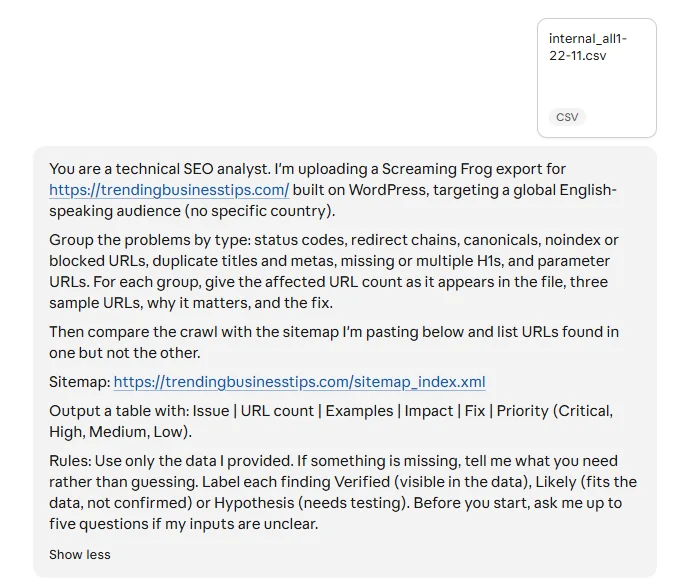
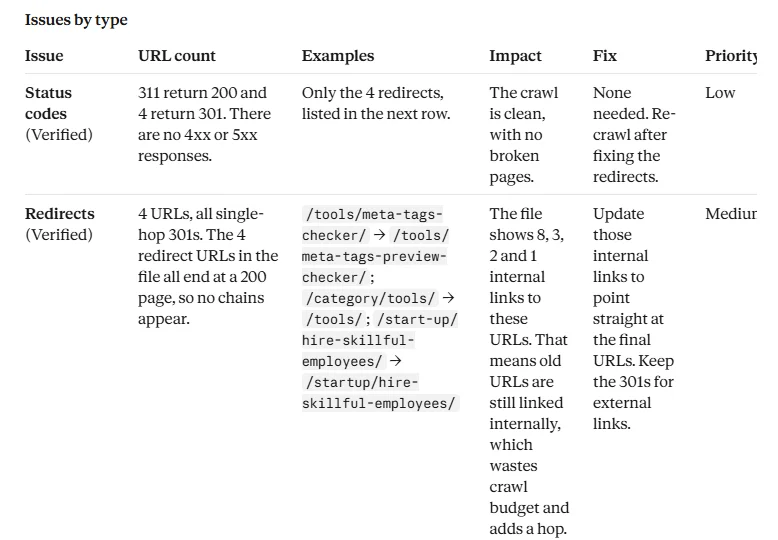
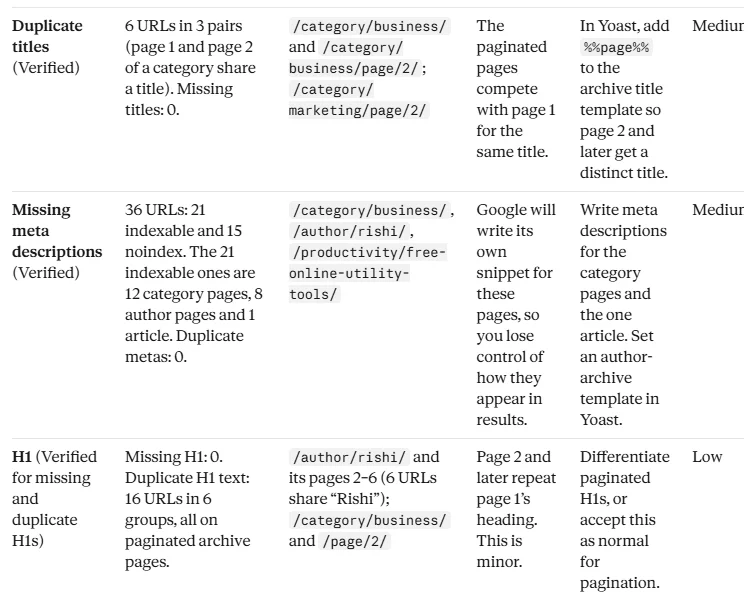
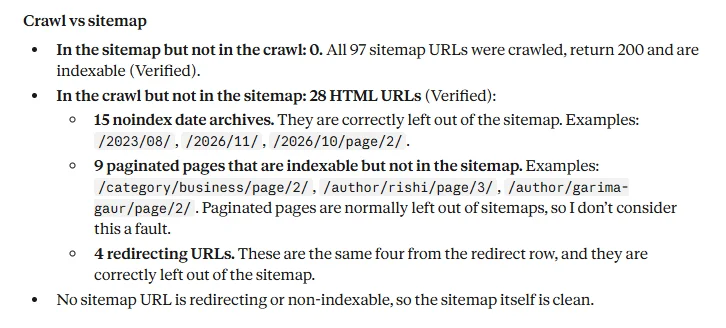
Here is how this prompt performed on a real site. I ran it on the Screaming Frog crawl of Trending Business Tips, my own website, using Claude. I replaced the placeholders, attached the crawl CSV and gave it the sitemap URL. The screenshots below show the output as it came back.
Screenshot 1: The prompt as I ran it, with the crawl export attached.
Screenshot 2: Status codes and redirects. The crawl had no 4xx or 5xx errors, but four old URLs still had internal links pointing at them (14 links in total). Those are easy fixes that a crawl table rarely makes this obvious.
Screenshot 3: Duplicate titles and missing meta descriptions. Page 2 of some category archives shared the exact title of page 1, and 21 indexable pages had no meta description.
Screenshot 4: Crawl vs sitemap. All 97 sitemap URLs were crawled and indexable. The 28 crawled URLs missing from the sitemap were date archives, paginated pages and redirects, and the model explained why that is normal.
What I like about this output is how it handled gaps. Where the file didn’t have the data (multiple H1s, robots.txt, which pages link to the redirects), it said what was missing and what I needed to export. That is the rules block doing its job. The findings also turned out to be useful: the audit gave me a short, realistic fix list for my own site instead of a generic checklist.
2. Keyword clustering
I'm sharing a keyword export for [site URL], a [business type] serving [audience] in [country]. It includes volume and difficulty from [tool].

Sort the keywords into clusters where one page could reasonably rank for all of them. Give each cluster a name, a primary keyword, supporting keywords, search intent (informational, commercial, transactional or navigational) and whether it needs a new page or fits an existing one from this list: [URLs].

Set aside any keywords that are off-topic, ambiguous or near-duplicates. Do not group keywords just because they share a word. Use the volume and difficulty numbers exactly as they appear in my file.

End with the five clusters I should build first, with one line of reasoning each.
Add the rules block.
Watch for: the model cannot see which keywords share SERPs unless you give it SERP data. Treat the clusters as a first pass, then check the top ones in Google before committing to pages.
3. SERP and intent check
Target keyword: [keyword]. Market: [country]. My site: [URL].

Below are the top [5 to 10] ranking URLs with their headings and key content. [paste]

Tell me what kind of page Google is rewarding here: article, category, product, tool, video or forum thread. Describe the main intent and any secondary one. List the subtopics and questions that appear on most of these pages, and the ones that appear on only one or two.

Then suggest what page type I should build, a working H1, and an H2 outline that covers the common ground and adds something the current pages miss.

Keep what you observed in the results separate from what you recommend.
Add the rules block.
Watch for: claims about SERP features (AI Overviews, People Also Ask) you did not supply. If you have not shown it a screenshot, it has not seen them.
4. Competitor and content gaps
This covers both competitor research and gap analysis in one pass, since the two overlap heavily.
My site: [URL]. Competitors: [URL 1], [URL 2], [URL 3]. Market: [country].

I'm uploading my keyword export, each competitor's keyword export, and my sitemap.

Find topics where competitors rank and I have no relevant page. Find topics where I have a page but it looks thin next to theirs. For each gap, say whether it needs a new page, an update to an existing URL, or nothing because it's irrelevant to my business.

Output: Topic | Primary keyword | Who covers it | My closest page | Action | Intent | Priority.

Finish with the 15 gaps most worth pursuing. Don't suggest copying competitor content, and don't propose two pages for the same intent.
Add the rules block.
Watch for: gaps that are real but wrong for your business. A competitor ranking for something you would never sell is not a gap.
5. Topical map
I run [site URL], which offers [products or services] to [audience] in [country]. Our main goal is [leads, sales, signups].

Here is my content inventory: [URLs and titles].

Build a topical map around the core topics this business should own. For each cluster, give a pillar topic, supporting article ideas, the likely intent, related entities or terms, and a suggested URL. Mark each idea as Existing (with the URL) or New.

Skip topics that don't connect to what we sell. Where I haven't supplied search data, call the ideas hypotheses rather than opportunities. Finish with the first 20 topics to publish.
Add the rules block.
Watch for: padding. If a cluster has 40 article ideas, most are filler. Cut hard.
6. Content brief
Write an SEO content brief for a writer who already knows the subject.

Topic: [topic]. Primary keyword: [keyword]. Audience: [who]. Market: [country]. Format: [guide, listicle, landing page]. Business goal: [goal].

I'm pasting the keyword list, three competitor pages and two of our own related posts below.

The brief should include: working title and H1, search intent, secondary and long-tail keywords, an H2/H3 outline, questions the piece must answer, what the competitors miss, where we can add original examples or data, internal link suggestions from our posts only, and a fitting call to action.

Guide the writer without scripting sentences. Don't suggest statistics unless they appear in the material I gave you.
Add the rules block.
7. On-page review
Review this page for on-page SEO. URL: [URL]. Primary keyword: [keyword]. Secondary keywords: [list]. Page type: [blog, category, product, service].

Current title: [title]
Current meta description: [description]
Current H1: [H1]
Page content: [paste]
Competitor pages for comparison: [paste or URLs]

Check the title, meta description, heading hierarchy, opening paragraph, topic coverage, internal links and anchor text, and the call to action. Point out missing subtopics and repetition. Compare with the competitor pages.

Give me a table (Element | Problem | Fix | Priority), followed by one recommended title, one meta description, a suggested H1 and a short action list. Keep what already works. Don't rewrite the whole page.
Add the rules block.
8. Bulk titles and meta descriptions
I'm uploading a sheet with columns: URL, current title, H1, primary keyword, page type.

Draft a new title and meta description for each row. Titles should aim for around 55 to 60 characters and descriptions for 140 to 155. Put the primary keyword near the front of the title where it reads naturally. Describe what's actually on the page and don't promise anything the page doesn't deliver. Vary the wording across rows so they don't all follow one pattern.

Return CSV with these columns: URL, new title, new description.
If a row doesn't have enough information, write "needs input" instead of guessing.
Watch for: character counts. The model will say a title is 58 characters when it is 71. Paste the output into Sheets and use =LEN() to check. Search engines truncate by pixel width anyway, so treat those numbers as approximate.
9. Internal linking
I'm uploading a Screaming Frog export (inlinks, crawl depth, indexability) and a list of URLs with titles for [site URL].

Find pages with very few internal links, pages that sit deep in the structure, and orphan pages if the sitemap shows them. Then suggest links I should add: source page, destination page, natural anchor text, and the sentence or section where the link would fit. Prioritise destination pages that matter to the business: [list target URLs].

Only suggest a link if a reader would find it useful. Mark clearly which links already exist and which are new. Flag repetitive or off-topic links I should remove.

Output: Source URL | Destination URL | Anchor | Where it fits | Why | Priority. End with the 20 best additions.
Add the rules block.
Watch for: anchors that repeat the exact target keyword every time. Vary them by hand.
10. Backlink review
I'm uploading a backlink export from [Ahrefs, Semrush] for [site URL], plus the same for [competitor URL]. Industry: [industry]. Market: [country].

Look at referring domains, anchor text spread, which of our pages attract links and which attract none. Point out patterns that deserve a manual look, such as sudden spikes, repeated anchors from unrelated sites or clusters of links from the same network. Then list link opportunities: domains that link to two or more competitors but not to us, and pages of ours that deserve links but have none.

Treat tool scores such as toxicity as prompts for investigation, not verdicts. Don't recommend a disavow without a specific reason.

Output: Finding | Domain | Target URL | Anchor | Risk or opportunity | Next step.
Add the rules block.
Watch for: invented metrics. If you didn’t upload domain rating, it shouldn’t appear in the answer.
11. Schema review
Review the structured data on this page. URL: [URL]. Page type: [blog, product, service, homepage].

JSON-LD currently on the page: [paste]
Visible page content: [paste]
Validator output, if any: [paste]

List the schema types in use. Check the syntax, compare each property against what's visible on the page, and point out mismatches, duplicates and conflicting entities. Note any required or recommended properties that are missing for the type. Suggest other schema types only if they genuinely describe the page.

Separate three things: syntax errors, eligibility problems and optional improvements. Don't add ratings, reviews, prices or author details that aren't on the page. If you write corrected JSON-LD, use only facts from the content above.
Add the rules block.
Watch for: the model promising rich results. Schema makes a page eligible. It guarantees nothing. Run any output through the Rich Results Test before it goes live.
12. Search Console analysis
Export the data with both periods side by side and calculate the changes in your sheet first.
I'm uploading a Search Console export for [site URL]. Market: [country]. Business type: [type]. Current period: [dates]. Comparison period: [dates]. The change columns are already calculated.

Start with the pages and queries that moved the most, up and down. Then find queries with high impressions and weak CTR, pages that show up but earn few clicks, and queries sitting between positions 5 and 15 that could move with some work. Split branded from non-branded queries using this brand term list: [terms]. If two of our pages appear for the same query, flag the overlap as possible cannibalisation.

Remember that average position is a blend across users and devices, not an exact rank. Don't explain a drop unless the data supports the explanation.

Group your top 15 findings under: CTR, content, new keyword chances, declines to investigate, internal linking, and needs more data. For each, give the page or query, the numbers from my file, and one next step.
Add the rules block.
13. GA4 organic landing pages
I'm uploading a GA4 landing page report filtered to Organic Search for [site URL]. Dates: [range]. Comparison: [range]. Primary goal: [leads, sales, signups]. Key events tracked: [list].

Compare pages by sessions, engagement rate, key events and revenue. Separate the pages that have a traffic problem from the ones that get visits but fail to engage or convert. Check whether tracking might explain odd numbers, such as a page with sessions but zero events.

Low engagement doesn't automatically mean the page is bad. Consider what the page is meant to do before you judge it. For each of your top 15 pages, say whether the fix is more traffic, better engagement, a clearer call to action or tracking repair.
Add the rules block.
Watch for: blog posts being judged against product pages. Tell the model which pages are meant to convert and which are meant to inform.
14. Traffic decline diagnosis
Run prompt 12 first. This one works best when you already know roughly where the loss sits.
Organic traffic to [site URL] fell during [dates] compared with [dates]. The drop is about [x%]. Business type: [type]. Market: [country]. Known changes in that window (migration, redesign, new plugin, content removals): [list or "none known"].

I'm uploading GSC data, GA4 organic landing pages, and where available a crawl and rank tracking export.

Find which pages and keyword groups account for most of the loss. Check branded vs non-branded. Then work through possible causes one by one: indexing or canonical changes, redirects, lost internal links, search demand or seasonality, CTR changes from SERP layout, stronger competitors, outdated content, cannibalisation. For each cause, say what in the data supports or contradicts it.

Don't blame an algorithm update unless the timing and the affected pages clearly line up. Don't promise recovery.

Output a table: Page or cluster | Before | After | Change | Likely cause | Evidence | Action | Effort. Then give a roadmap: immediate fixes, content work, on-page edits, internal links, competitor review, long-term plan.
Add the rules block.
Watch for: a neat single-cause story. Real declines usually have two or three causes stacked together.
15. Content refresh
I'm uploading a list of blog URLs for [site URL] with publish date, last update date, clicks, impressions and average position for the past 12 months, and for the 12 months before that.

Sort the posts into four groups: Refresh (traffic slipping but topic still relevant), Merge (overlaps with another post), Leave alone (stable or growing), and Remove or redirect (no traffic, no purpose). For every post in Refresh or Merge, say what to change, in one or two lines, based on the data. If the data can't tell you what's wrong with a post, say that, and tell me what to check in the SERP.

Output: URL | Group | Trend | Reason | Suggested action | Priority.
Add the rules block.
Watch for: “update the content” as the only advice. Push it for specifics, or ask it to compare the post with the current top three results.
16. AI search visibility
No AI tool can tell you how visible you are in AI answers. You have to collect the evidence yourself, then use the model to find patterns.
Take 20 to 30 queries that matter to your business. Search each in ChatGPT, Perplexity, Gemini and Google’s AI results. Record whether your brand appears, whether your site is cited, and which sources are cited instead. Put that in a sheet, then:
I'm uploading a sheet of [number] queries I tested across AI answer tools. Columns: query, tool, whether we were mentioned, whether we were cited, and the sources that were cited.

Look for patterns. Which query types do we show up for and which do we miss? Which domains and page types get cited most often? What do the cited pages have in common (format, structure, depth, freshness, clear definitions, original data)? Compare the cited pages with our closest equivalent page, using the content I've pasted below.

Suggest specific edits to our pages. Results from AI tools change from one run to the next, so call out where I should repeat the check rather than draw conclusions from one test.

Our pages: [paste]
Add the rules block.
Watch for: treating one test as a ranking. Repeat the check on different days.
17. Monthly SEO report
Feed it final numbers only. Do not ask it to pull or calculate them.
Write a monthly SEO summary for [client or stakeholder], who is [role] and doesn't read SEO jargon.

The table below has this month's and last month's organic clicks, impressions, top pages, conversions and notable changes. Our work this month: [list].

In under 300 words, cover: what happened, why we think it happened (flag what's confirmed and what's a guess), what we did, and what we plan next month. Lead with the number that matters most to their goal of [goal]. Use plain language. If a number looks like a tracking error, say so.

Data: [paste]
Watch for: spin. If traffic dropped, the report should say so in the first sentence.
Using Multiple Prompts in a workflow
One big prompt rarely beats a few small ones in sequence. A traffic drop, for example, goes like this:
- Prompt 12 on the GSC export to find where the loss sits.
- Prompt 14 on those pages, with GA4 and crawl data added.
- Prompt 1 on the affected folder only, to check for technical causes.
- Prompt 15 on the posts that lost ground but are still relevant.
- Prompt 17 to turn the findings into a client update.
Between steps, read the output and correct it. If the model got something wrong, tell it, and carry the corrected version forward.
How to Analyze and Process the Output
- Open the source file and verify any number the model quotes before it goes into a deck.
- Be wary of tidy answers. Real data is messy, and a clean story often means the model skipped something.
- Test recommendations on a few pages before rolling them out sitewide.
- Anything marked Hypothesis needs a test, not a ticket.
Final thoughts
The prompts above won’t do your thinking. What they do is shorten the road from a messy export to a clear next step. Start with the one that matches the task in front of you this week, adjust it to your site, and keep the version that works.

Rishi Pundir is an entrepreneur and author who enjoys exploring the latest business and technology trends, news, and insights across the web. He graduated in computer science and has years of experience in digital marketing. He is also passionate about writing in-depth articles on business, emerging technologies, innovations, digital marketing, and strategies for online business growth. He is the main editor of Trending Business Tips.